WildScale

For Adobe Premiere Pro

Frame one shot.
We'll do the rest.

WildScale cuts your raw video, then reframes it for Reels, clip by clip, while you watch it happen on your timeline.

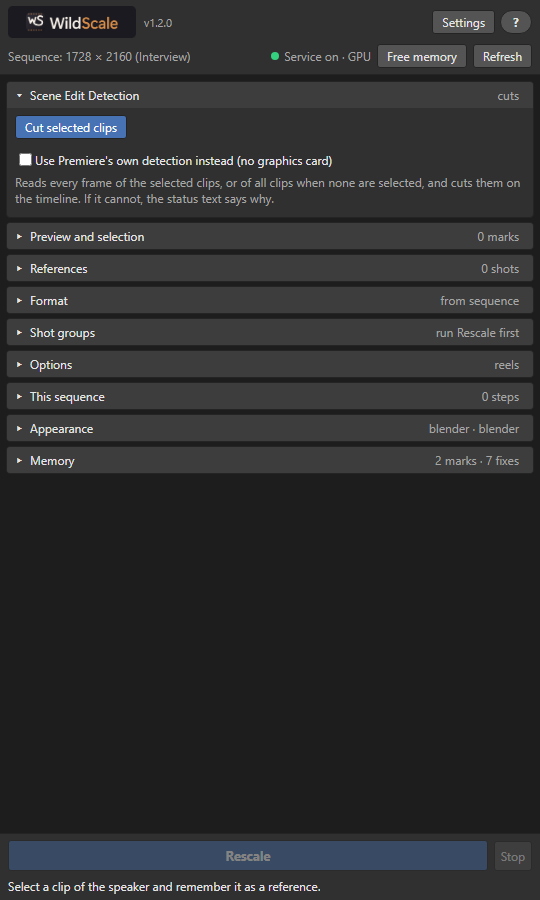
The WildScale panel with Scene Edit Detection open

Take the tour

Click to play, with sound. 36 seconds through the panel.

See it in 45 seconds

How it works

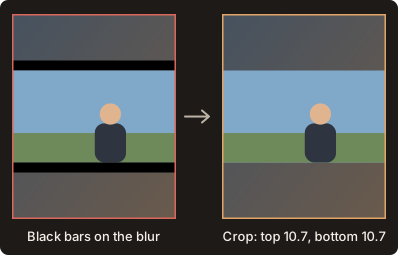
A clip with black bars on top and bottom, before and after WildScale adds a Crop
Removes black bars. It measures the bars inside your footage and crops exactly that much, only on the sides that have them.
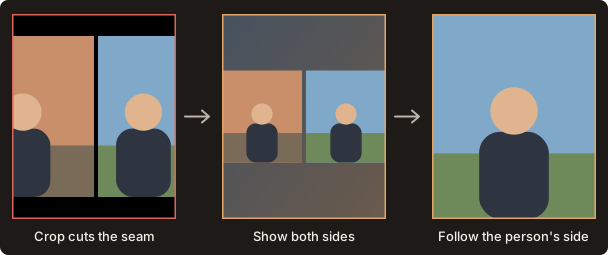
A split screen cut by the crop, and the two fixes
Reads split screens. The crop stays off the seam. Show both sides, or follow the person's side.
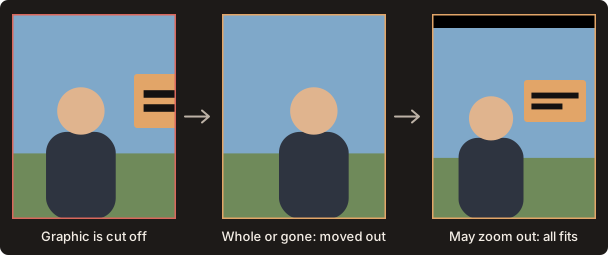
A graphic cut off by the canvas edge, and how a reference rule clears it
Follows your rules. Each reference decides which graphics may show, and whether it may zoom out to clear them.

Knows your speaker

Set the framing once. Matching shots across your cuts follow it.

Keeps titles whole

Text that leaves the crop gets a small move or a clean back blur.

Stays on your computer

Frames are analyzed locally. Your footage is never uploaded.

Finds every cut

Reads each frame, on your graphics card when it can, and cuts video and audio.

Pastes your framing

Matching shots get your exact Scale and Position, or you copy them by hand.

Works within your memory

Settings checks your system and adjusts to the memory Premiere leaves free.